A colleague pings you on a Tuesday: “Hey, do we have NX Motion? Can you get me access?”
You manage thirty-odd license servers across three sites, a renewal calendar that never fully empties, and a vendor naming scheme that calls the thing nx_motion_ult on one server and something slightly different on another. You’re not even certain “NX Motion” is the real feature name.
The honest answer is “give me a bit.” Then you run lmstat again and again, SSH into the servers, open license files, and search for whatever you think the feature might be called.
That afternoon is the problem this article is about. Almost every license question your team gets reduces to one of three shapes:
- Where is it? You half-know a name and need to find where it lives across the estate.
- Why can they use it and I can’t? Two people, same application, different luck. One gets a license; the other gets a message saying the feature doesn’t exist.
- When did this change? A quantity dropped, a feature vanished, or an expiration moved. Someone wants to know when and, ideally, why.
LiMon has a dedicated screen to answer each one. None of them require you to remember a server, a port, or exactly what the vendor calls the feature.
“Where is it?” — Estate license search
The first screen is the one your colleague’s question lands on. In the LiMon navigation it’s called Find a License, and it does exactly one thing: you type part of a name, and it tells you everywhere that feature exists across every monitored server.
What makes the search useful across a real estate is what it matches. License servers use vendor mnemonics such as nx_motion_ult, CATIA_V5_HARDWARE, and 86984ACD2025. People use product names such as “NX Motion,” “CATIA Hardware Design,” and “AutoCAD 2025.”
LiMon maintains a mapping between the two (that’s a separate story). The search checks both the raw feature name and its friendly display name. “NX Motion,” “nx_motion,” and simply “motion” therefore find the same thing. You can start with two characters; you don’t need to know the answer before you ask.
Results come back grouped by feature, and that grouping is the whole point. For each match you get:
- The raw vendor feature name and the friendly display name side by side.
- An estate-wide total: how many licenses you own and how many distinct servers carry them.
- A per-location breakdown: every server holding the feature, with its quantity, expiration date (blank means perpetual), site label, and current status (
UP,DOWN,ERROR, or decommissioning).
That last list is what closes the ticket. Your colleague asked where NX Motion is; now you can answer: “We have seven seats of NX Motion Ultimate across two servers: five in Munich and two in Turin, where the server is currently down. We also have four seats of NX Motion Simulation on the RLM server in Munich.”
The search found both the FlexLM feature nx_motion_ult and the RLM feature NXMOTIONSIM under their friendly names. The exact vendor name did not matter. If nothing matches, the screen also says so plainly. An empty result is a quick, legitimate “we don’t have that,” not an error or an ambiguous silence.
This is the screen that replaces an afternoon of SSH and grep. One search, the whole estate, across both the feature’s raw code name and its friendly name as mapped in LiMon.
“Why can they use it and I can’t?” — Feature coverage
The second question is harder to diagnose because it looks like a bug. Two engineers use what the company calls “HyperWorks.” One checks out a license and gets to work. The other gets denied, even though seats are free and colleagues can access the same feature at that moment. Naturally, they assume something is broken.
Often nothing is broken. The application is simply served by more than one license server: perhaps one per site or region, plus an independent server for a particular team. Those servers do not always carry an identical set of features.
The engineer who succeeded was pointed at a server with the feature they needed. The other engineer was pointed at a server without it. The application name is the same; the inventory underneath is not.
LiMon surfaces this on the application detail page as Feature Coverage. It takes one application, looks at all of its active production servers, and reports the features that are not present on every one of them. The rule it applies is deliberately simple:
- It compares production deployments only. Test and development servers, which routinely differ, do not muddy the picture.
- A feature counts as present when the server licenses it. Quantity is ignored. This view answers “is it there at all?”, not “are there enough seats?” Usage and savings analysis answer the second question.
- It needs at least two production servers to mean anything. With one server there is nothing to compare, so LiMon hides the view instead of showing a trivially “complete” result.
When every production server carries every feature, the view tells you so in one line: all features present on every production server. You can stop looking here and investigate other causes, such as a quantity ceiling, a user or host restriction, or a borrowed seat.
When there is a gap, the view lists only the features missing from at least one server. Anything present everywhere drops out. A green check or a grey dash shows which servers carry each remaining feature:
This answers questions such as “Do we have feature X at the Munich office? If not, where is it available?”
In this example, the denied engineer needed MotionSolve and their workstation was pointed at the Munich server. Munich does not carry that feature, while colleagues using the London LM-X server never saw a problem. The apparent bug is a coverage gap, and now it has a name and a location.
What remains is a decision: add the feature to the servers that lack it, point that team at a server that has it, or confirm that the gap is intentional and explain the access boundary. Either way, you are no longer guessing.
This view reports server-level presence, not who was denied. It does not list affected users or replay denial events; that information comes from denial analysis in the reports.
Feature Coverage gives you the structural explanation beneath the complaint, which is usually the part that is hardest to see.
“When did this change?” — License history
The third question appears after the fact. The pool that used to have 50 seats now shows 45. A feature you would swear was there is gone. An expiration date you were counting on has changed, and nobody remembers why.
Someone made a change, perhaps three months ago, and now you need the trail.
LiMon keeps that trail automatically. Every polling cycle, it compares each server’s current license inventory against what it last saw, and any difference becomes a dated, typed entry in License Inventory Changes. You don’t enable it or configure anything; it’s a side benefit of monitoring.
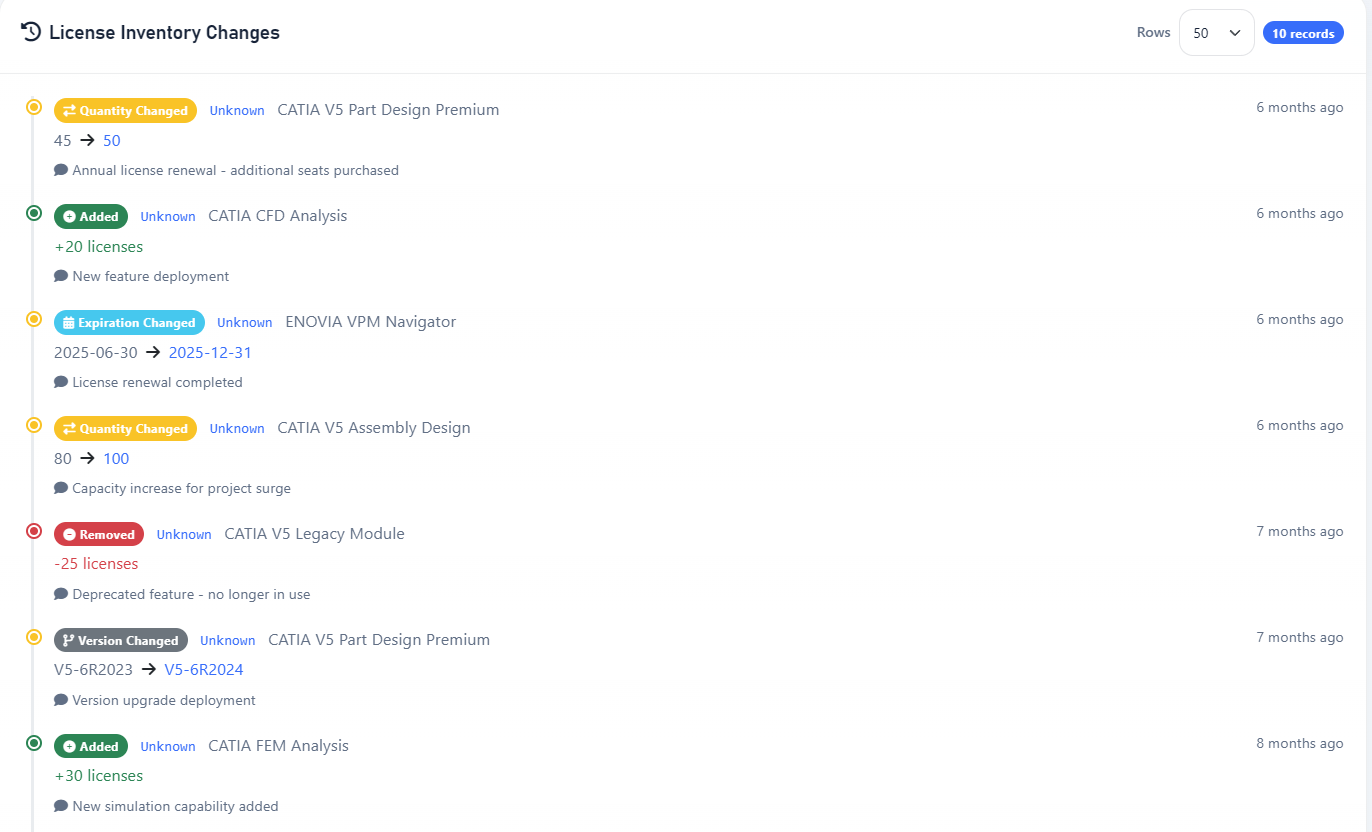
It tracks five kinds of change, and the timeline color-codes each so the trail of a renewal is legible at a glance:
- Added: a feature appeared on a server that did not have it, perhaps through a new entitlement or deployment.
- Removed: a feature disappeared entirely, perhaps because a module lapsed or a server was decommissioned.
- Quantity Changed: the seat count moved, shown as a plain 45 → 50.
- Version Changed: the licensed version moved forward, for example V5-6R2023 → V5-6R2024.
- Expiration Changed: a feature’s expiry date moved, for example 2025-06-30 → 2025-12-31. This is evidence that a renewal reached the server.
Each entry carries the feature, the server where it happened, the before → after values, and a timestamp. The what and when are captured automatically, but the why often lives in someone’s head. You can therefore add an optional reason from the Admin UI, such as “Annual renewal; additional seats purchased” or “Deprecated feature; no longer in use.”
Six months later, when finance asks why the CATIA line increased, the answer is next to the event instead of buried in email.
The poller cannot see every relevant event. A contract may change on paper, or you may want to record a future-dated purchase before it appears in lmstat. You can add those entries by hand from the Admin UI so the history is not limited to what a server happened to report.
In the main LiMon interface, the history appears on each server and application detail page. In the Admin UI, one view brings together changes from across the estate and lets you filter them by server or feature.
That is the difference between “I think we increased CATIA last spring” and “we went from 80 to 100 seats on March 14, and we recorded why.”
Three questions, one estate
The three screens answer three questions you’ll keep getting about your license estate:
- Find a License answers where: the whole estate, either form of the name, in one search.
- Feature Coverage answers why access differs: the structural gap between an application’s servers that explains some denials.
- License Inventory Changes answers when and why it changed: an automatic, annotated audit trail.
None of these views asks you to know the answer in advance. You do not need a server, a port, or the exact vendor mnemonic. You can start with what you actually have: a half-remembered name, a confused user, or a number that changed.
LiMon resolves that clue against the inventory it has been maintaining all along. License management stops being a memory test.
Where LiMon fits
LiMon polls FlexLM, RLM, LM-X, and DSLS servers across your network and keeps a live picture of what each one carries. That inventory powers the search, coverage, and history views above, as well as utilization analysis, audit-defense records, and data for renewal conversations.
LiMon runs on your hardware, with no cloud, no agents on the license servers, and no phone-home. Request an evaluation to point it at your own estate, then choose Standard or Professional for the server scale and analytics you need. All the features discussed in this article are available in both editions.