Two conversations decide what you spend on engineering licenses, and you rarely walk into either with the evidence you need. The first is the annual renewal, where the vendor’s rep has a quote, a list price, and a number to hit. You have a hunch about whether you even use what you already pay for.
The second is the audit or true-up, where the vendor asserts what you owe and the burden of disproving it lands on you. Both conversations come down to the same question: can you prove what your organization actually used?
Here’s the part that’s easy to miss. For the teams LiMon is built for, with floating license servers running on their own network and no phone-home, the vendor does not have that answer either. Your servers do not send usage outside your network. That cuts both ways: the vendor walks in with list prices, entitlement counts, audit rights, and the records your contract requires you to provide. Your real usage is whatever you can prove. If you have not kept your own record, there is no measured number in the room but theirs.
So the job is to keep that record. LiMon does part of it by watching your license servers from the network: it polls them continuously and stores what it sees, so a usage history accumulates from the day you deploy it.
Polling still has blind spots. A session can start and finish between two polls, and denials may exist only in the server log. Those logs can also reach back to before LiMon was watching. Importing them — from the command line, the web UI, or the REST API — completes the picture. The harder part, and most of this article, is making sure the result is trustworthy enough to put in front of a vendor.
Doesn’t real-time monitoring make log import redundant?
It’s a fair question. Server logs contain checkouts, checkins, and usually more, depending on the license manager and its configuration. At first glance, log ingestion can look like a duplicate of network polling, as though you could pick one or the other. Not really.
Network polling gives you the now: who has what checked out, whether the daemon is healthy, and whether the pool is at 100%. Because LiMon stores each poll, it also builds a sampled history from the moment you deploy it. That live view tells you something is on fire before the tickets arrive. A later log import cannot do that.
What logs add is reach into what happened between polls, denials that a live query cannot reconstruct, and the period before you started watching.
- Active checkouts and availability
- Server and daemon health
- Sampled history from deployment onward
- Short sessions
- Denials, queues, and server events
- History from before monitoring began
There is no single clean “vendor log.” FlexNet Publisher describes its debug log as diagnostic output and explicitly separates it from reporting. RLM’s report log, by contrast, is documented for usage reporting and even authenticates its contents. LM-X and DSLS expose useful activity only when the right logging or tracing options are enabled.
Even the better formats are operational records, not your renewal case. Restarts, rereads, retries, rotation boundaries, and partially captured sessions still have to be interpreted. Turning them into defensible evidence is your job.
It is worth being clear about why that work falls to you. License-manager vendors have little reason to prioritise how useful these logs are as evidence. Their customers are the software publishers that license through them, not you, and several of them would rather sell you a proprietary reporting product or a services engagement than have you mine the logs you already have. They are not in the business of helping you buy less from their customers — and they are certainly not in the business of building the case you would use against them at renewal.
The value of importing logs is not that they are perfect. It is that, treated according to their actual format, they fill three gaps that polling alone leaves open.
What polling misses, and logs catch
Short sessions. Polling is scheduled. If a checkout starts and ends between two polls, LiMon never sees it. For an editor like NX that engineers leave open for hours, missing the occasional session is a rounding error. For an Abaqus job that finishes a solve in under a minute, polling can make a feature look idle when the team is actually using it frequently.
That blind spot cuts against you. Write a busy feature off as idle, drop its seats to save money, and you may spend the next quarter fielding denials.
Denials. Polling will tell you the pool is at 100%. The log can tell you who tried to check out a license and got turned away. That is the difference between “we’re using everything we own” and “demand exceeded supply,” and it is the single most valuable thing logs can add. It gets its own section below.
Server-side events the network view doesn’t expose. License managers keep useful information in their logs that a status query may not reveal: a daemon failing to serve some licenses, clients requesting an incompatible version, or requests for features you do not own. Many of these remain invisible until you inspect the log.
Denials: proof, not just pressure
A denial is the event where a user requested a license and the server did not grant it. FlexLM writes DENIED; RLM writes DENY; LM-X and DSLS record refusals when the relevant logging or tracing is enabled. The record can identify the user, feature, time, and reason. That specificity is exactly what a renewal argument usually lacks.
Here is how the conversation normally goes without it. Users complain. The vendor’s rep, whose answer to a capacity problem is predictably “buy more seats,” is ready to help. Polling gives you utilization, a strong signal that you are running hot but not a verdict. Without denial evidence, you cannot put a number or pattern on the shortfall, so the negotiation runs on anecdote and the rep’s framing wins.
Denial data changes that in both directions. That is the point: it is evidence, not ammunition.
- Sometimes it confirms the upsell. Two hundred distinct denials a month on one feature, spread across the engineering team, indicate a real capacity problem. Now you are discussing a specific number of seats backed by a specific pattern, not pleading.
- Just as often it kills it. Pull the same data and find the denials clustered around three users whose overnight batch runs collide for ten minutes at 2 a.m. That is a scheduling fix, not a purchase. You have just avoided an upsell you would have approved on instinct.
Denial counts also let you quantify the cost of saying no: engineer-hours lost waiting on a license, jobs that didn’t run. That’s the number finance wants sitting next to “cost of more seats,” and it’s the one you can only produce from the logs.
Two cautions, because a denial count you cannot defend is worse than none. First, one frustrated user retrying five times in a minute can produce five lines for one period of blocked work. Count events naively and you will overstate the problem. RLM helps here: its DENY record includes a last_attempt field, and the vendor documentation says only a non-zero value represents a final denial to the application.
Second, denial evidence depends on configuration. LM-X requires extended logging, and DSLS requires license usage tracing. If the relevant capture was never enabled, an empty denial report does not prove that nobody was denied.
Audit defense: your numbers before their invoice
A software audit, or its politer cousin the true-up, starts with the vendor telling you what they believe you deployed and used and asking you to reconcile. The asymmetry is the whole problem. They arrive with a position built from your entitlements, price lists, deployment records, and whatever your contract requires you to report; you react to it.
They cannot see an isolated on-premises estate, but that does not help if the only usage figures on the table are the ones they inferred. The only thing that levels the conversation is an independently kept record of what your servers actually served.
That record is what a clean log import builds. Concretely, audit-defense evidence is:
- Continuous, not sampled. An audit can look back twelve months or more. A dashboard that only holds the last 90 days cannot answer for a period you no longer retain. At minimum, keep evidence for the full period a renewal, true-up, or audit can look back over. The collection must be running before you need it; you cannot reconstruct a quarter whose logs were rotated away.
- Reconciled, not raw. Handing a vendor a pile of debug logs invites them to interpret the messy parts and exposes usernames and workstation names that are worth scrubbing first. What holds up is a normalized, deduplicated history where retries, rereads, rotation boundaries, and incomplete sessions have been accounted for: a number you can explain line by line.
- Peak-aware. Concurrent licensing is constrained by simultaneous demand, not average use. Your analysis stands or falls on an accurate peak, and that depends on matching checkout and checkin events. Skip the latter and every session looks infinite.
Be honest with yourself about what this does and does not do. Your logs are your record; they will not always match the vendor’s to the token, and they are not a legal shield. What they give you is a defensible number of your own instead of an obligation to accept theirs. That is often the difference between negotiating and simply signing.
What each format actually contains
The supported formats look similar from a distance: timestamps, usernames, and feature names. Their semantics and configuration differ enough that treating them as interchangeable will produce bad evidence.
FlexLM debug log (lmgrd -l <path>)
The richest diagnostic stream of the group. It records OUT, IN, DENIED, QUEUED, vendor-daemon health, lmgrd restarts, and license-file rereads. Caveats:
- Starting
lmgrdwith-l pathoverwrites that file when the daemon starts. Use-l +pathwhen you need append behavior, then rotate and archive the file deliberately. - Standard debug entries use time-of-day stamps. Where your FlexNet Publisher version supports it,
-datestampadds an ISO 8601 date and time-zone offset to each entry and removes a major source of ambiguity across midnight and daylight-saving changes. - Borrowed or lingering checkouts do not behave like ordinary interactive sessions. Preserve those markers and apply the relevant license policy before using them in concurrency analysis.
RLM report log (REPORTLOG +<path>)
Designed for usage reporting rather than debugging. It has explicit START, PRODUCT, OUT, IN, DENY, queue/dequeue, and shutdown records, which makes it the most audit-friendly of the four out of the box. RLM also authenticates report-log sections so later modification can be detected. Caveats:
- The
+prefix on the path enables append mode. Without it, opening the configured report log overwrites the file. - A
DENYline is not automatically a final denial to the application. Use thelast_attemptfield; Reprise documents a non-zero value as the final attempt. - Report-log versions and formats (
std,small,detailed) change the fields available on checkout and checkin records. Preserve the header and parse according to its declared version.
LM-X usage log
LM-X server logs contain checkout and checkin activity and can be configured for normal or extended detail. Caveats:
- Denied-request statistics require extended server logging. In LM-X 6, set
log.format: extendedin the YAML configuration or use the License Server UI. Older releases useLOG_FORMAT=EXTENDED. - LM-X lets administrators exclude message types such as checkout and checkin. Verify the exclusions before assuming an incomplete log represents no activity.
- Rotation can be daily, weekly, monthly, or disabled. Collect the rotated files as well as the active one, and retain the source server when consolidating multiple nodes.
DSLS server log with usage tracing
DSLS writes server logs, but detailed grant, release, timeout, and refusal activity appears only when License Usage Tracing is enabled for the relevant licenses. You can enable it in the License Administration Tool or with DSLicSrv -admin and the setLicenseUsageTraces command. Caveats:
- Tracing is not retroactive. If it was disabled, the missing period cannot be reconstructed from later status queries.
- Each member of a failover cluster writes its own log files. Collect every member and preserve server identity before consolidating the events.
- DSLS starts a new log when the server restarts or the configured size limit is reached. Token and credit usage can also appear in separate
TokenUsage...logfiles, whose quantities should not be treated as ordinary concurrent seats.
The quiet failure modes
Most bad imports do not fail loudly. They produce numbers that look reasonable and are slightly wrong, which is the worst outcome when you plan to use them in a renewal or audit response. Watch for these patterns whether you are building a pipeline or evaluating someone else’s.
Rotation without continuity. The importer follows the active filename, the server renames it during rotation, and an unread tail is left behind in the rotated file. Retain and ingest both active and rotated files. Track progress using the file identity plus an offset or event identity, not the modification timestamp alone.
Timezone ambiguity. Formats differ in what they record. RLM report logs carry time-zone information in modern versions; FlexNet debug logs can add an ISO date and offset with -datestamp; other records may depend on server-local time. Determine what each source actually emits before normalizing it. Otherwise, a daylight-saving change can look like a gap or duplicate hour.
Encoding and locale. Active Directory usernames often contain accented characters, while older daemons may write in the operating system’s locale rather than UTF-8. Müller becomes M?ller when an importer guesses wrong, and per-user reports stop matching reality. Detect or configure the source encoding, then normalize to UTF-8.
Partial lines during collection. Reading the active file while the daemon is still writing can expose an incomplete final line, especially on slow or remote storage. A robust importer retains that fragment for the next pass or flags it; it never turns the fragment into a complete event.
Skipping checkins. Import only OUT and denial events and every checkout appears to last forever. That is a fast route to absurd peak numbers and a recommendation to buy seats you do not need. Import the full event lifecycle even when a particular report only displays start times.
Polling and logs working together
The hard part is not merely parsing the logs. It is combining them with what polling already saw, without double-counting or leaving gaps.
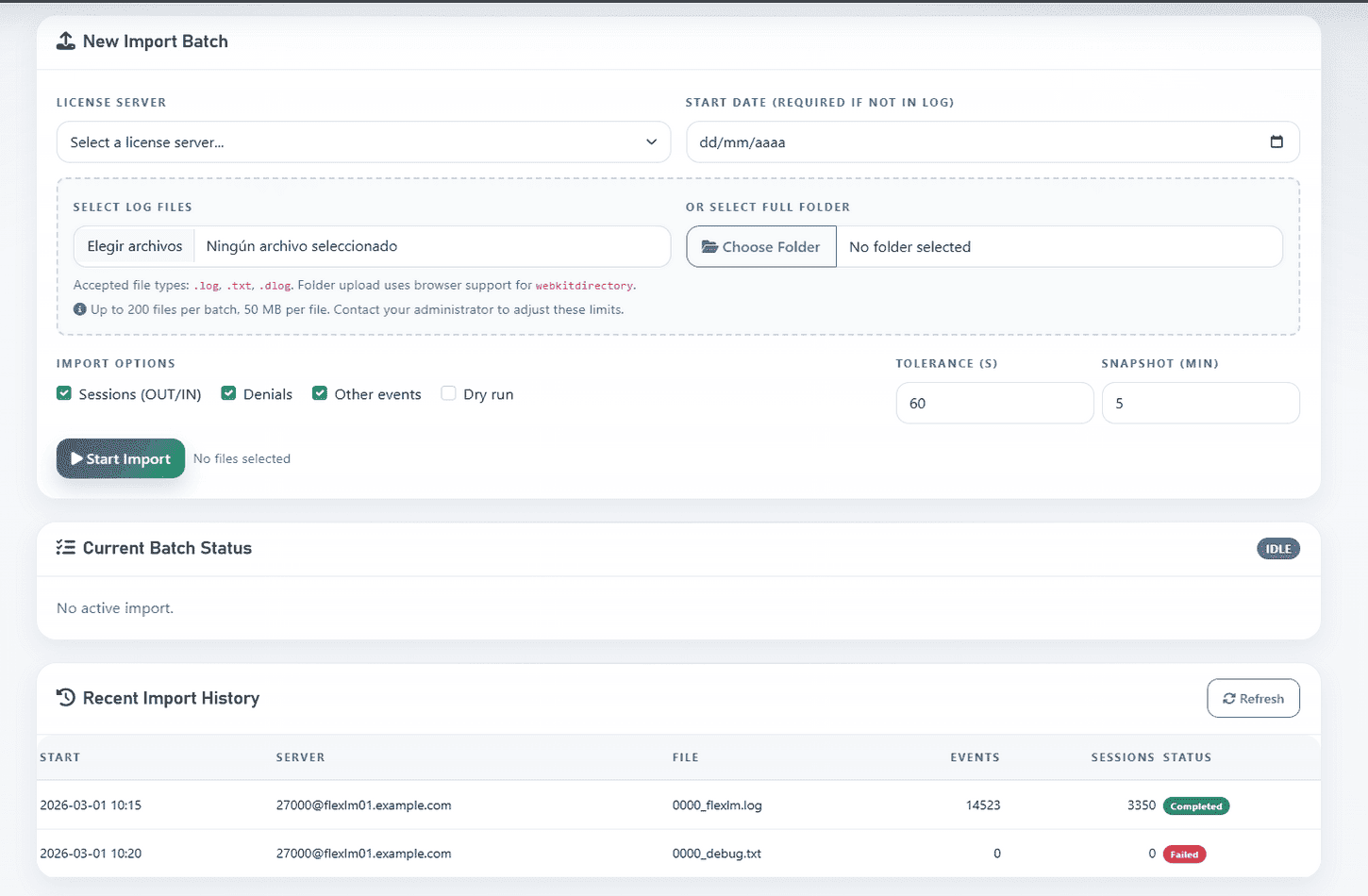
LiMon accepts individual files or folders through the web interface, and the same workflow is available from the command line and through the REST API. You choose the server and the event types to process; LiMon keeps batch status and import history visible.
Once the raw events are in, LiMon pairs checkouts with checkins, deduplicates within a time tolerance, and rebuilds the affected date range so the fresh log evidence merges with the sessions it already had from polling. The dashboards and reports for those dates then reflect the combined picture instead of two versions of the truth.
That combined record feeds the cost-optimization views that track utilization and contention over time and the executive reports used in renewal negotiations and audit responses.
The reports are what justify the careful import work. A renewal conversation goes very differently when you can show a clean twelve-month breakdown, denials included, than when you can only describe what people remember.
A short audit-readiness checklist
If you’re reviewing your own setup today, regardless of tool:
- Verify the capture settings: append mode for FlexNet and RLM (
lmgrd -l +path,REPORTLOG +path), extended logging for LM-X, and License Usage Tracing for DSLS. - Confirm the date, time-zone, and daylight-saving information each source actually emits.
- Make sure rotation cannot strand unread events in renamed files, and retain history for the period your contracts and internal policy require.
- Spot-check a few lines with non-ASCII characters and confirm they round-trip through your store correctly.
- Pick one feature and reconcile its checkout count against checkins. Explain open-at-shutdown sessions and any remaining drift.
- Pull a denial count for one busy feature and sanity-check it. For RLM, respect
last_attempt; elsewhere, distinguish repeated retries from separate periods of blocked work.
If any of those checks returns a surprise, the rest of your numbers may be at risk too. So is the case you plan to make with them.
Where LiMon fits
Most teams running engineering licenses have better things to do than maintain their own parsing pipeline. LiMon brings polling, log ingestion, and historical reporting into one on-premises stack: no agents on the license servers, no cloud, no phone-home.
Request an evaluation to try the workflow, then choose Standard or Professional for your server scale and reporting needs. Active maintenance unlocks the Intelligence views, including Audit Defense and Savings: interactive reports you explore live and export when a vendor or your CFO needs a document. That is the difference between “we monitored everything” and “we can prove it on the renewal call.”